Introduction to EzDIS
- On this page
- What EzDIS is
- How it works in a business
- Main modules
- Supported integrations
- First recommended steps
- Help
What EzDIS is
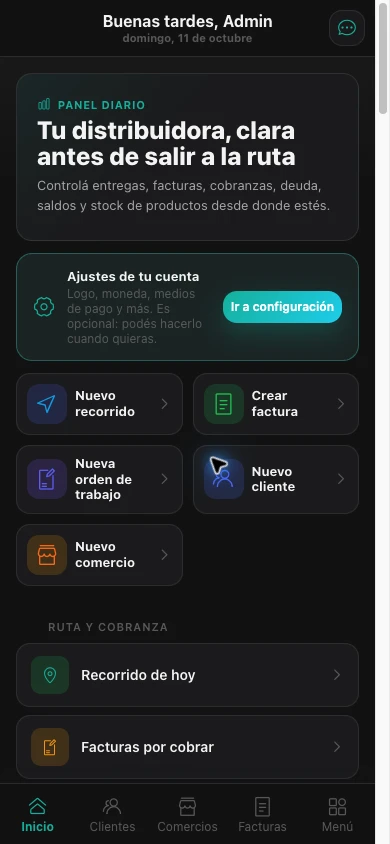
EzDIS is business management software for companies that sell, invoice and collect payments. It brings together customers, products, stock, invoices, collections, account balances and credit balances. If your operation includes deliveries, it also provides orders, routes and visit tracking.
It runs in the browser, so you can manage the business from a computer or use it from a phone at the point of sale, on a visit or during a delivery.
It also includes IoT: sensors (temperature, power consumption, doors), fleet GPS and time clocks, with a free MQTT broker to connect your devices.
How it works in a business
A typical flow is:
- You add your customers or business accounts.
- You add products, categories, currencies and taxes.
- You issue invoices and record collections, partial payments or credit balances.
- You review each customer's account balance and due dates.
- You configure WhatsApp or email notices when you need them.
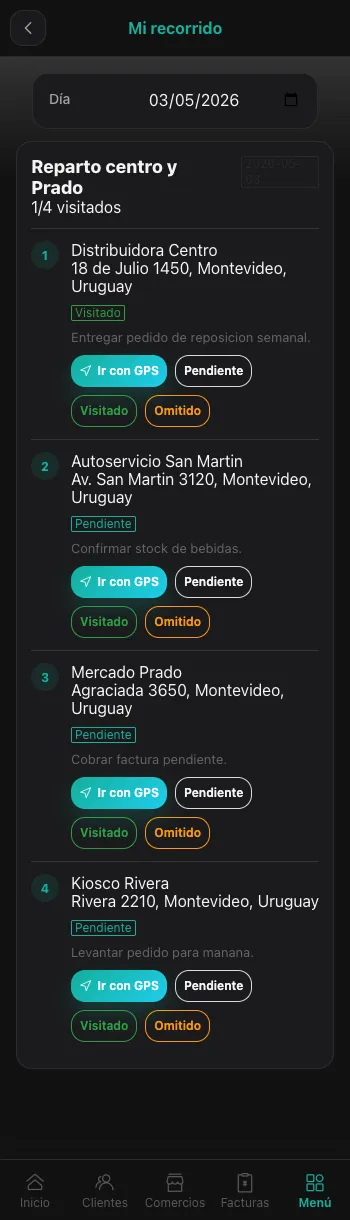
- If you make deliveries, you build daily or recurring routes and assign them to the team.
- When applicable, you declare documents through Biller/DGI or ARCA.
Main modules
| Module | What it is for |
|---|---|
| Dashboard | Review collections, pending invoices, overdue debt and recent activity |
| Stores | Manage businesses with tax ID, phone, email, address, account balance and credit balance |
| Clients | Manage people or non-company clients with invoices, payments and credit balance |
| Products | Catalog items with price, tax, currency and category |
| Templates | Load frequent orders without adding products manually every time |
| Invoices | Create invoices, e-Tickets, e-Invoices, credit notes and debit notes |
| Collections | Register partial or full payments, use available credit and review pending debt |
| Credit balances | Credit overpayments, make adjustments and apply credit to future invoices |
| Routes and deliveries | Organize visits by employee, with statuses and navigation links when you make deliveries |
| Users and roles | Give the team controlled access through permissions |
| Orders | Receive and review orders, including by WhatsApp (message, voice note or photo of the list), before turning them into invoices |
| AI assistant | Ask about clients, invoices and reports in natural language |
| Automatic invoicing | Generate recurring charges from rates or plans, with late fees |
| Groups and broadcasts | Send email or WhatsApp notices to groups of clients |
| Signatures | Send documents for signature and record delivery receipts signed on the phone |
| Fleet map | See vehicles and drivers live with GPS, daily routes and alerts |
| Sensors | Monitor temperature (cold chain), power consumption and doors, with alerts |
| Attendance | Review clock-ins, late arrivals and overtime from time clocks |
| EV chargers | Monitor charging sessions and cost per kWh for OCPP chargers |
Supported integrations
| Integration | Use |
|---|---|
| Biller | Issue and declare e-Tickets, e-Invoices, credit notes and debit notes before DGI if you have an active account |
| ARCA | Issue Argentinian invoices A, B, C and notes with CAE for businesses in Argentina |
| MercadoPago | Generate payment links and record approved payments through webhooks when configured |
| PayPal | Collect online invoice payments with PayPal and record approved captures through webhooks |
| Send notices for invoices, payments, debt and due dates | |
| AI assistant | Ask questions about business data and get help with common workflows |
| Traccar | Receive locations from vehicle GPS trackers or the driver’s phone (Traccar Client app) for the fleet map |
| MQTT | Connect WiFi sensors (Shelly, ESPHome, Tasmota) to a free MQTT broker, with email alerts |
| ZKTeco time clocks | Receive clock-ins from fingerprint or face time clocks to review attendance and overtime |
| OCPP | Connect EV chargers and review sessions, energy and cost per kWh |
| E-signature | Send documents for signature by WhatsApp or email and keep the signed document on the record |
| Route optimization | Order stops and calculate the duration and expected times of each route |
First recommended steps
- Create or access your application.
- Complete general data.
- Add products, categories, stores and clients.
- Configure invoicing and alerts if you need fiscal declaration or customer notices.
- If you make deliveries, create templates and routes.
- Give access to the team with the right roles.
Help
Use the guides in this manual as a checklist. If something is not clear, contact support at soporte@ezdis.net and include the account name, the screen and the action you were trying to perform.