- On this page
- Main features
- Store or client configuration
- System requirements
- Cost
- AI chatbot
- Transfer to a person
- Tips and troubleshooting
- Which countries receive WhatsApp notices?
The WhatsApp integration in EzDIS helps send invoice notices and reminders when the service is enabled for your account.
Main features
- Invoice notices: when you create an invoice, you can check Send via WhatsApp to notify the client with the amount, due date, and payment link.
- Payment links: if MercadoPago or PayPal are configured and the invoice has a link available, the message can include it.
- Payment confirmation: when a payment is recorded, the notification flow can communicate it if messaging is active.
- Pre- and post-due reminders: in Settings → WhatsApp notifications you choose how many days before the due date to remind and how many days after to warn about delinquency. They are sent every day at 10:00, Uruguay time, and only while the invoice remains unpaid. If a partial payment exists, the notice asks only for the remaining balance.
- Mass and scheduled notices: from Menu → Broadcasts you send a message to all your clients or to a group, now or scheduled, and it can repeat weekly or monthly. See Client groups and broadcasts.
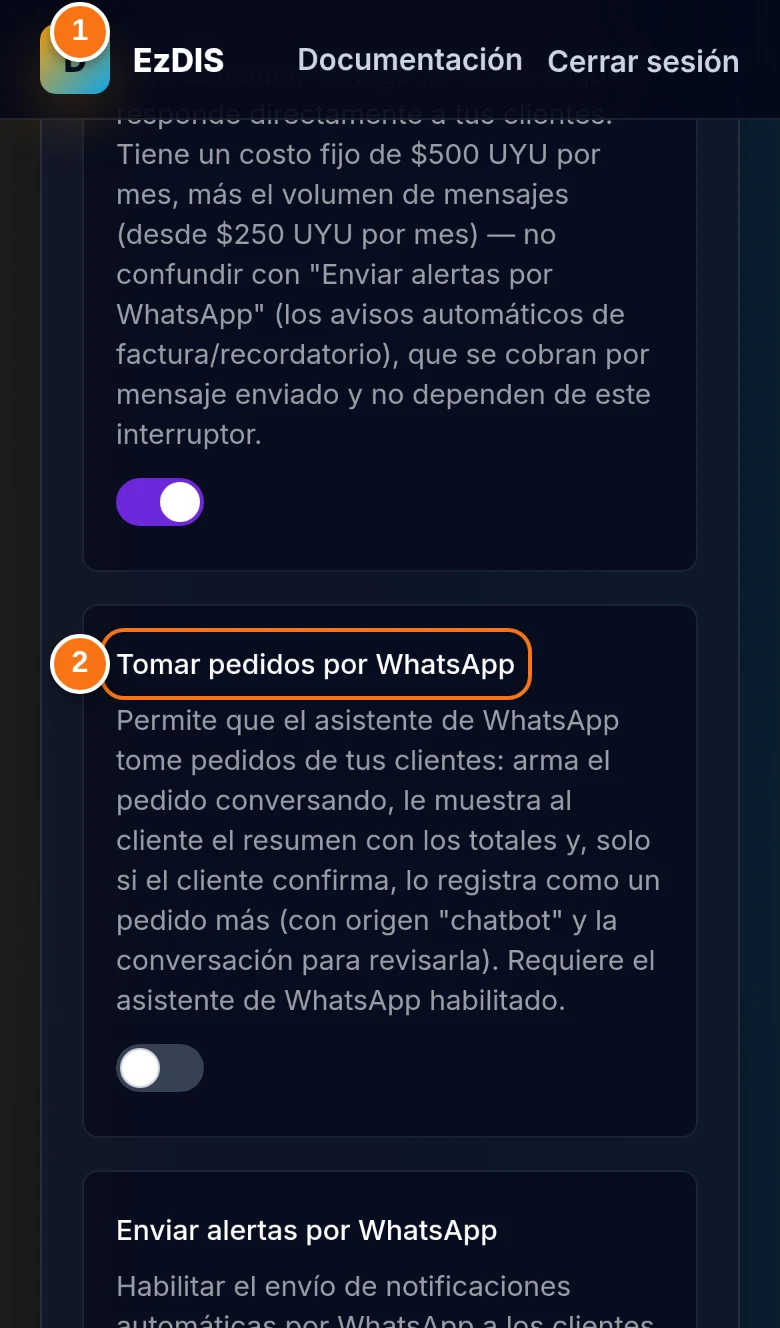
- WhatsApp orders: your clients can place an order by chatting with the assistant. See WhatsApp orders.
- AI chatbot: if enabled, it lets the client interact with an artificial-intelligence bot to ask questions. This bot is fed with the documentation you upload.
- WhatsApp Assistant: replies to your team and to your clients via WhatsApp.
- Take orders via WhatsApp: the assistant builds the order through conversation and records it when the client confirms.
Store or client configuration
To ensure sending works correctly, check the record of each entity:
- Phone: you can write it as used in your country (e.g.,
099 123 456): if it lacks a country code, your account’s code is used. For a number from another country, write it with+and its code. - Enabled alerts: The “Receive WhatsApp alerts” option must be checked when appropriate.
System requirements
- The messaging service must be active for your EzDIS account.
- Message delivery depends on the service configuration, the recipient’s number, and WhatsApp provider rules.
Cost
EzDIS includes up to 50 WhatsApp messages per month at no extra charge. If your account exceeds that volume, the extra volume incurs a monthly fee. Automatic assistant replies to clients also count toward this limit.
The AI chatbot (the one that converses with your team and your clients, not the automatic invoice or reminder notices) has a monthly cost based on message volume. It is enabled and disabled separately; see below.
Amounts in your country’s currency are listed in Pricing.
From Menu → Monthly usage you can see how many WhatsApp and email messages were sent this month, and tap View each message for the full detail: recipient, reason, and date of each.
AI chatbot
When a client replies to a WhatsApp message (for example, a pending-invoice notice), if you have the function enabled, an automatic assistant replies instantly, without any team member needing to intervene first.
- Enable or disable the assistant: from Settings → WhatsApp notifications → WhatsApp Assistant (staff and clients) you can turn it off completely (both the one your team uses and the one that replies to your clients) without affecting the automatic invoice or reminder notices, which continue to work.
- Own invoices: the assistant reports the status, amount, and due date of the client’s invoices, always with the real data from your account.
- Notice context: if the message is a reply to an automatic reminder, the assistant already knows which invoice it refers to — the client can ask directly “what is this?” without specifying the invoice number.
- PDF delivery: the client can ask “send me the invoice” or “I want the receipt” and the assistant sends it as an attachment.
- General questions: if you uploaded documents marked Visible to clients (see Menu → Assistant documents in the AI Assistant), the assistant also uses them to answer FAQs, policies, or terms.
- End the conversation: the client can type exit or end at any time. If nothing is written for 24 hours, the conversation closes automatically.
- One number across multiple businesses: if the phone matches clients from more than one of your stores, the assistant asks them to choose which one they want to talk to.
Transfer to a person
If the client asks to speak with someone (“I want to talk to a human”, “customer support”, etc.), the assistant stops replying automatically and notifies your support team:
- Support contacts: manage who receives these alerts from Menu → WhatsApp support contacts. Each contact needs a phone, an email, or both, and can be marked active or inactive.
- By email: an email alert is always sent to each active contact that has one loaded.
- By WhatsApp: additionally a WhatsApp message is sent to contacts with a phone, when that channel is enabled for your account.
While the conversation is transferred, the client can keep writing — all their messages remain visible to whoever resumes the chat.
Tips and troubleshooting
- Messages not received: verify that the loaded number is the one the store uses on WhatsApp. In Menu → Monthly usage you can see if each message was delivered and, if not, why.
- Preventive collection: use the pending invoices and upcoming collections filters to decide whom to contact.
- Efficient route: notifying the invoice via WhatsApp can reduce inquiries at the store when the channel is enabled.
Which countries receive WhatsApp notices?
Today WhatsApp notices do not reach Brazil numbers (+55): Meta, the company behind WhatsApp, does not allow our account to send messages there. Therefore the app no longer attempts to send them to those numbers and, when notifying an invoice, tells you “WhatsApp does not reach numbers in this country”. Notify that client by email.
If in Menu → Monthly usage a message appears as undelivered, the code explains why:
- 63058: WhatsApp does not allow sending messages to that country.
- 63024: the number does not have WhatsApp or is invalid. Check that it is complete, with the country code.