Usual orders
- On this page
- Types
- Creating a usual order
- Using it when taking an order
- Repeat the last order
- Scheduling automatic orders
- See what was created
- Benefit
A usual order is the list of products a shop normally buys. It is not an order yet: when you use it, or schedule it, an order is created that someone reviews, picks and only then turns into an invoice. Find it in the menu under Catalog → Order templates.
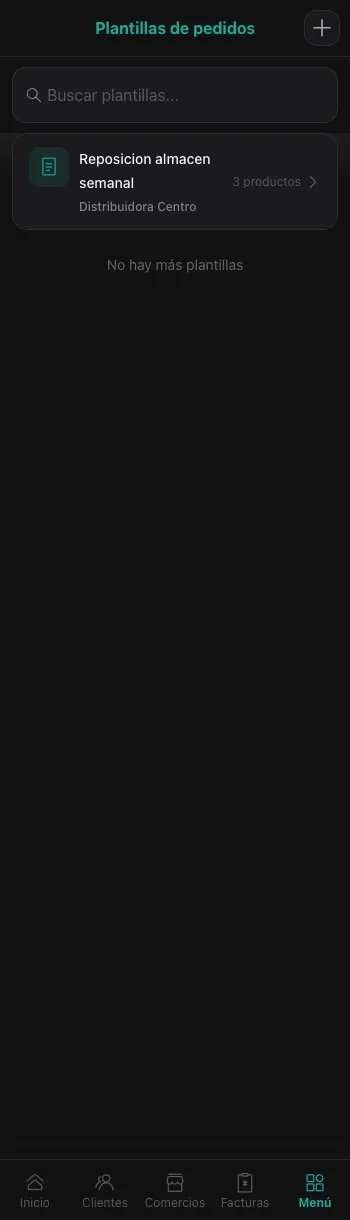
Types
- Global: valid for every shop. Example:
Basic restock,Drinks promo. - Assigned to a shop: with Assign to business it stays for one specific shop. Example:
Weekly bakery order.
Creating a usual order
- Open Order templates and tap New template.
- Enter a name (and a description if you like) and, if needed, assign it to a shop.
- With Add product, add the products with quantity and discount. You see the final price of each line.
- Save it.
Using it when taking an order
When taking an order choose Load the usual order (when creating an invoice, Load from a template): its products are loaded and you adjust the quantities before saving. See Orders.
Repeat the last order
When taking an order for a shop or customer, the Repeat the last order button loads the lines of their previous order with today's prices. If they have no previous orders yet, the screen tells you. It is the fastest way for someone who almost always buys the same.
Scheduling automatic orders
From the usual order, Schedule orders creates the orders by itself, every so often:
- For whom: a shop or a customer.
- How often: daily, weekly or monthly, every 1 or more days, weeks or months. For monthly schedules, if the month does not have that day the last day of the month is used.
- First time: the start date. If you pick today, it is created in a few minutes.
- What is created each time: an order to review (recommended: someone reviews it and turns it into an invoice) or the invoice directly.
- Notify the client: by email and WhatsApp, depending on what the customer has enabled. The notice goes out when the invoice is created.
Before saving you see How it will work and the Upcoming dates.
In the list of schedules you see Next time and Last generated, and you can Pause, Resume or Remove each one (what was already created is not touched). If the system was down and a date was missed, everything overdue is not created at once: it is created a single time and the next one lands on the next future date. If one run cannot be generated, the screen shows why and it is retried the next day or as soon as you save changes.
See what was created
On each usual order you see the orders created from it, and every order shows which usual order it came from.
Benefit
Less typing on the road, fewer forgotten items and orders that arrive on their own for whoever reviews them.