Automatic invoicing by rates/plans
- On this page
- Assign a rate/plan to a client
- When to use it
- Before starting
- Recommended flow
- Review before declaring
- One invoice per client and day
- Choosing whether the client is notified
Automatic invoicing creates invoices from rates/plans assigned to clients. First create the rate/plan, then assign it to each client.
The recurrence is configured for each assignment: every 1, 2 or 3 months, or every 1, 15 or 30 days. The next invoice date can be reviewed and changed.
Assign a rate/plan to a client
From Menu → Rates, open the rate and select Add client under Clients with this rate. Choose the client, select Monthly or Daily, enter the interval in Every, review the next invoice date and leave Notify the invoice on if the client should receive the email and WhatsApp notice.
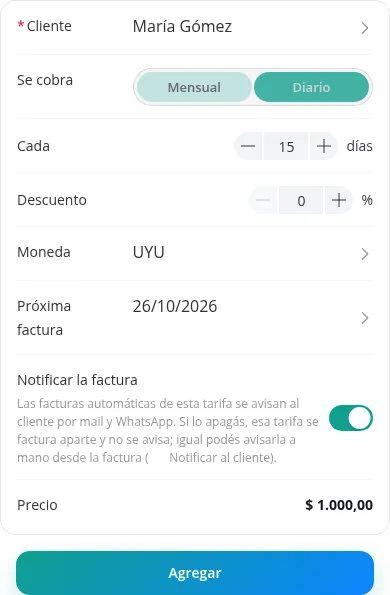
You can also edit the client and configure the same fields under Rates and recurrence. See Rates/Plans for the reusable charge and this guide for the automatic billing flow.
When to use it
Use it when a store or client has a repeated charge, a stable rate or a predefined service that should be invoiced periodically.
Before starting
- Products and taxes are loaded.
- The client or store exists.
- The rate or template has the correct products.
- Biller/DGI or ARCA is configured if you want to declare the document.
- WhatsApp is configured if you want automatic invoice notices and reminders.
Recommended flow
- Review the rate or template.
- Confirm products, quantities, prices and currency.
- Generate the invoice.
- Review the invoice before declaration.
- Declare it if fiscal integration applies.
- Send the notice if needed.
Review before declaring
Check tax ID, fiscal condition, invoice type, products, taxes and total. Once the invoice is declared, corrections should be made through notes, not by editing fiscal data directly.
One invoice per client and day
If a client has more than one rate billed on the same day, the system generates a single invoice with one line for each, instead of one invoice per rate. The client gets a single notice, a single payment link, and pays everything together.
To be combined, the rates must match on the client, the billing day, the currency, the late fee, and the notify the invoice option. If any of those differ, they go out as separate invoices. Each rate keeps advancing its own next billing date.
Choosing whether the client is notified
When you assign a rate to a client —from the client's record or from the rate's record— you'll see the Notify the invoice switch. It is on by default: each automatic invoice is announced to the client by email and WhatsApp, depending on what you have configured.
If you turn it off, the invoices that that rate generates are still created but are not announced. This is useful, for example, for clients you charge another way or prefer to notify yourself.
- Rates with and without notice are never combined into the same invoice. If a client has three rates on the same day, two with notice and one without, two invoices go out: one with the two rates with notice (which is notified) and another with the one that does not (which is not notified).
- On the client's record, the rates without notice show the Invoice not notified label.