How to set up go-e Charger Gemini with EzDIS
1. Create the charger in EzDIS
- Sign in to EzDIS, open EV Chargers and tap Add charger.
- Enter a Name (for example “Bay 1”) and the Max power (kW), then save.
- Connect “Bay 1” opens with the data you will enter in the go-e Charger Gemini:
- Server address (OCPP URL):
ws://devices.ezdis.net:9000/ev4k2p9x7q1m. - Secure address (wss://):
wss://charger.ezdis.net/ev4k2p9x7q1m. Use it if the charger supports a secure connection. - Charger identifier:
ev4k2p9x7q1m. On the charger it may be called ChargeBox ID, Charge Point ID or Identity. - Password, if the charger has that field. It is shown only once.
- Server address (OCPP URL):
If the charger has a separate field for the identifier, fill it in and still paste the full address: EzDIS recognizes the charger even if it adds its identifier or serial number to the end.
The data above is an example: use your charger's own. Each charger has its own identifier.
2. Configure the go-e Charger Gemini
The go-e speaks OCPP 1.6J directly from the charger, without going through the go-e cloud, over Wi-Fi or mobile data. It has no password field: the identifier goes at the end of the address.
- Open the go-e app and select the charger.
- Open the connection menu (Connection, or Internet in older app versions) and tap OCPP.
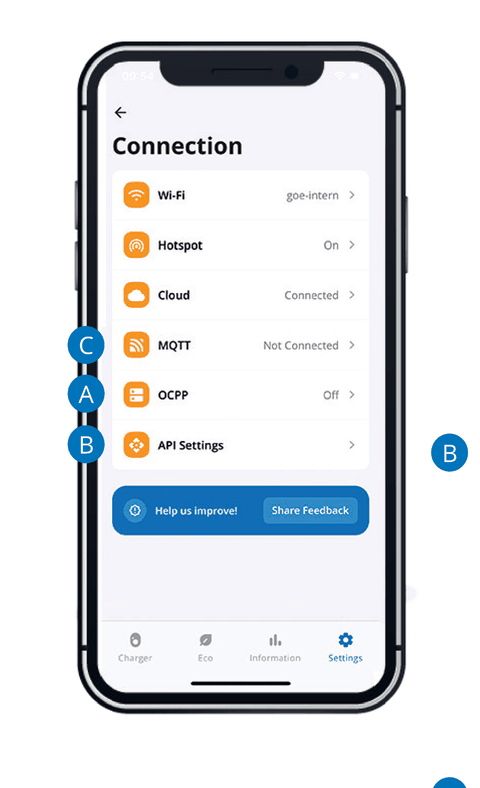
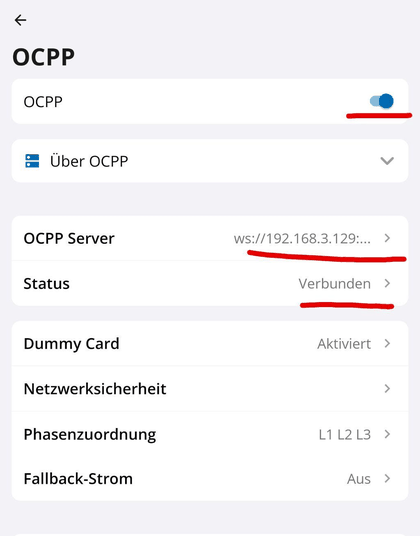
- Turn OCPP on with the switch.
- In OCPP Server paste the full address,
wss://charger.ezdis.net/ev4k2p9x7q1m(orws://devices.ezdis.net:9000/ev4k2p9x7q1m), and save.
Source: go-e, “go-eCharger API v2 – OCPP (GitHub)”
3. Check the connection
On the same screen, Status changes to Connected (“Verbunden” in the screenshot) once the charger talks to EzDIS. In EzDIS, the charger turns Available within a minute or two. If it does not connect with wss://, try the unencrypted address.
If it does not connect
- Check that the charger has internet access and that the address is complete, with no spaces.
- If the charger page shows “A charger is trying to connect from your network as…”, tap It is “Bay 1”: your charger uses its serial number as identifier and connects on its next attempt.
- If it says the server rejected it, the password does not match or the charger is not using the secure address (wss://).
Once connected you can start and stop sessions from EzDIS, register RFID cards, charge per kWh and see each person's usage: it is all in the EV chargers manual.
Manuals and documentation
Documentation reviewed on 2026-11-24. Compatibility depends on the variant and firmware.